 Huba
HubaTask Lists
Managing multiple task lists and switching between Claude Code projects.
Claude Code creates a new task list every time you start a session in a project directory, unless the CLAUDE_CODE_TASK_LIST_ID environment variable is set to reuse an existing one. Over time, this means you may accumulate multiple lists — one per session.
Huba lets you browse all available lists and quickly switch between them.
Switching Lists
Shift+L— open the list selection pageShift+M— instantly switch to the most recently created list
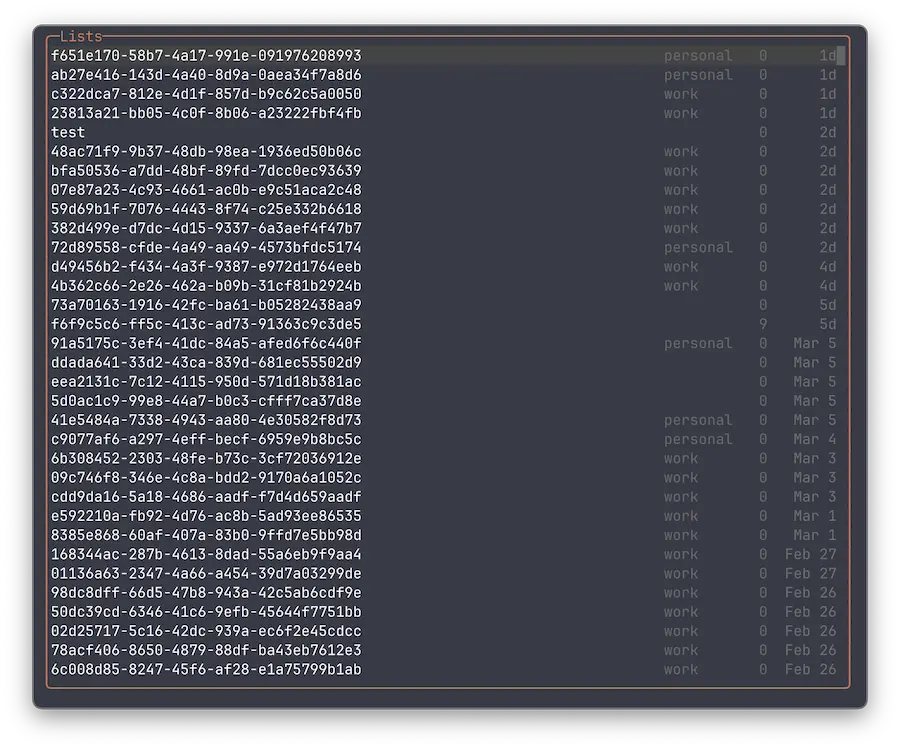
List Selection Page
Shows all available task lists with:
- List name (ID)
- Instance label (for CCS lists, shown dimmed)
- Task count
- Creation date (if terminal width allows)
Lists are sorted by creation date, newest first. Navigate with arrow keys, select with Enter, dismiss with Escape.
Claude Code Switcher
Claude Code Switcher (CCS) allows you to run multiple Claude Code sessions in parallel, delegate tasks to different model profiles, and manage concurrent coding workflows. It also lets you use multiple Anthropic accounts simultaneously and switch between them easily. CCS is useful when you need to work on several tasks at once, distribute work across different Claude instances, or manage multiple account quotas.
Huba supports CCS instances out of the box — no additional configuration needed. CCS task lists appear alongside regular lists, distinguished by an instance label.
Auto-Selection
On startup, Huba selects a task list automatically:
CLAUDE_CODE_TASK_LIST_IDenvironment variable — if set, selects the matching list- Previously selected list — persisted between sessions
- First available list — newest by creation date
CLAUDE_CODE_TASK_LIST_ID=a1b2c3d4-e5f6-7890-abcd-ef1234567890 hbReal-Time Updates
Huba watches task directories for changes. When a new list is created (e.g., by starting a new Claude Code session), a toast notification appears and the list becomes available immediately.