 Huba
HubaIntroduction
Huba is a terminal UI for managing Claude Code tasks.
AI coding agents thrive on focus. Give them too little context and they miss the mark. Give them too much and they drift. The key is breaking complex work into well-defined tasks — each with a clear goal, just enough context, and the right dependencies.
Instead of dumping an entire feature spec into a single prompt, you decompose it into focused steps. Each task carries only the context the agent needs to execute it correctly — a goal, relevant constraints, and dependencies on other tasks. One step at a time, with a clean context window.
Claude Code Tasks
Claude Code has a built-in task system designed exactly for this. You can ask Claude Code to create a task list, and it will break down your request into structured tasks — each with a status, description, and dependency information. Everything Claude Code needs to execute them in order.
The problem is visibility. There's no easy way to read through the generated tasks, check what's planned, or refine the details before execution. You're left either trusting the plan blindly or digging through raw files — neither of which scales when you have dozens of tasks with dependencies between them.
Where Huba Comes In
Huba gives you a terminal UI to see and work with those tasks before, during, and after execution. Browse the full task list, read descriptions rendered as markdown, check dependency chains, filter by status, and edit tasks that need refinement — all without leaving the terminal. When Claude Code updates a task, Huba picks up the change in real time.
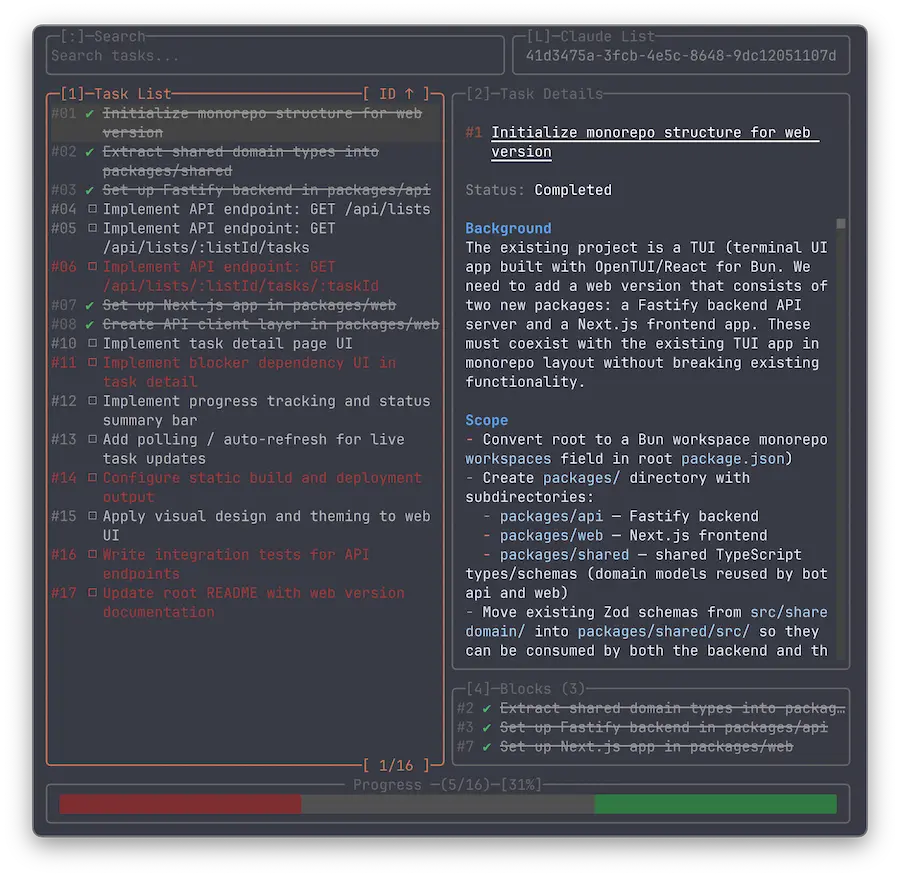
The result: you stay in control of the plan without slowing down the workflow.
Who It's For
Huba is built for developers using Claude Code who need a visual way to manage tasks from the terminal. If you work with Claude Code task lists and want to search, filter, and track progress without switching to a GUI, Huba fits into your workflow.